
Your Revenue Engagement Operating System

Every Lead Has a Story. Sales Tree Remembers Every Detail.

One intelligent workspace for your leads, customer conversations, follow-ups, sales teams and AI-powered engagement.

Capture every opportunity. Follow up consistently. Turn customer interactions into actionable context for your team.

30 days free for up to 3 users per company. Then $5 per user per month for full core-feature access. Third-party services and AI automation are billed separately according to usage.

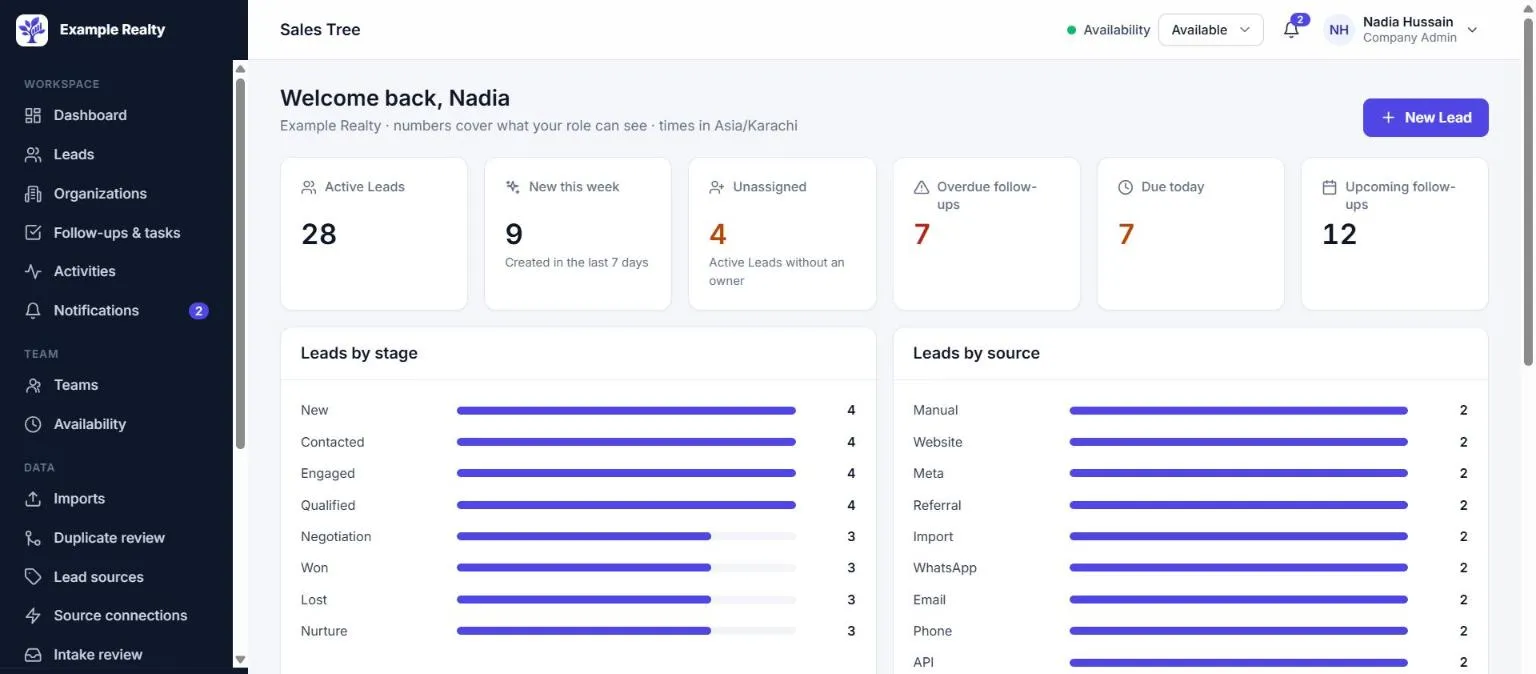
The Sales Tree dashboard: counts of active, new, unassigned and overdue work, and Leads by stage and by source.
The Sales Tree dashboard, shown with sample data.

Your Leads Are Everywhere. Your Revenue Process Shouldn't Be.

What gets in the way

  • Customer inquiries arrive through disconnected channels.
  • Customer history is scattered across phones, sheets and inboxes.
  • Follow-ups are forgotten or delayed.
  • Lead distribution depends on who happens to see the inquiry first.
  • Managers can't see who owns what, or what is overdue.
  • Manual data entry takes time and creates duplicates.
  • Every extra integration or AI service adds setup, cost and another login.

One permission-controlled workspace

  • One record per customer, identified by phone and email, with the full history in one place.
  • Every Lead has an owner, a stage and a next action, and every follow-up has a due date.
  • New Leads are assigned by the routing policy you configure, or wait in a visible queue.
  • Roles and teams decide who sees what. Each company's data is isolated from every other company.

Product overview

Every customer interaction becomes part of the Customer Brain

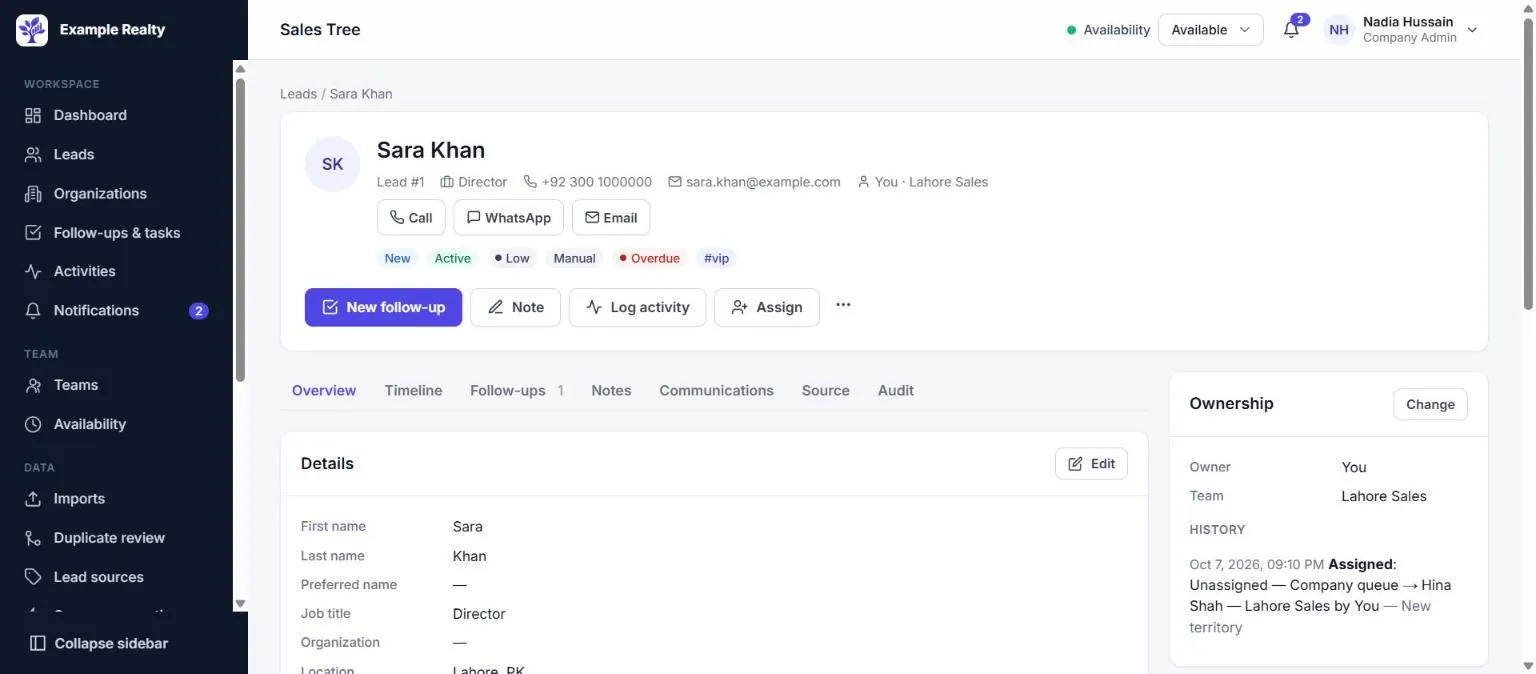
Each Lead is the customer: profile, ownership, follow-ups, notes and a single timeline of everything that happened.

A Lead profile with contact details, stage and priority tags, Call, WhatsApp and Email shortcuts, and New follow-up, Note, Log activity and Assign actions.
Customer profileContact details, stage, priority, owner and quick actions in one header.
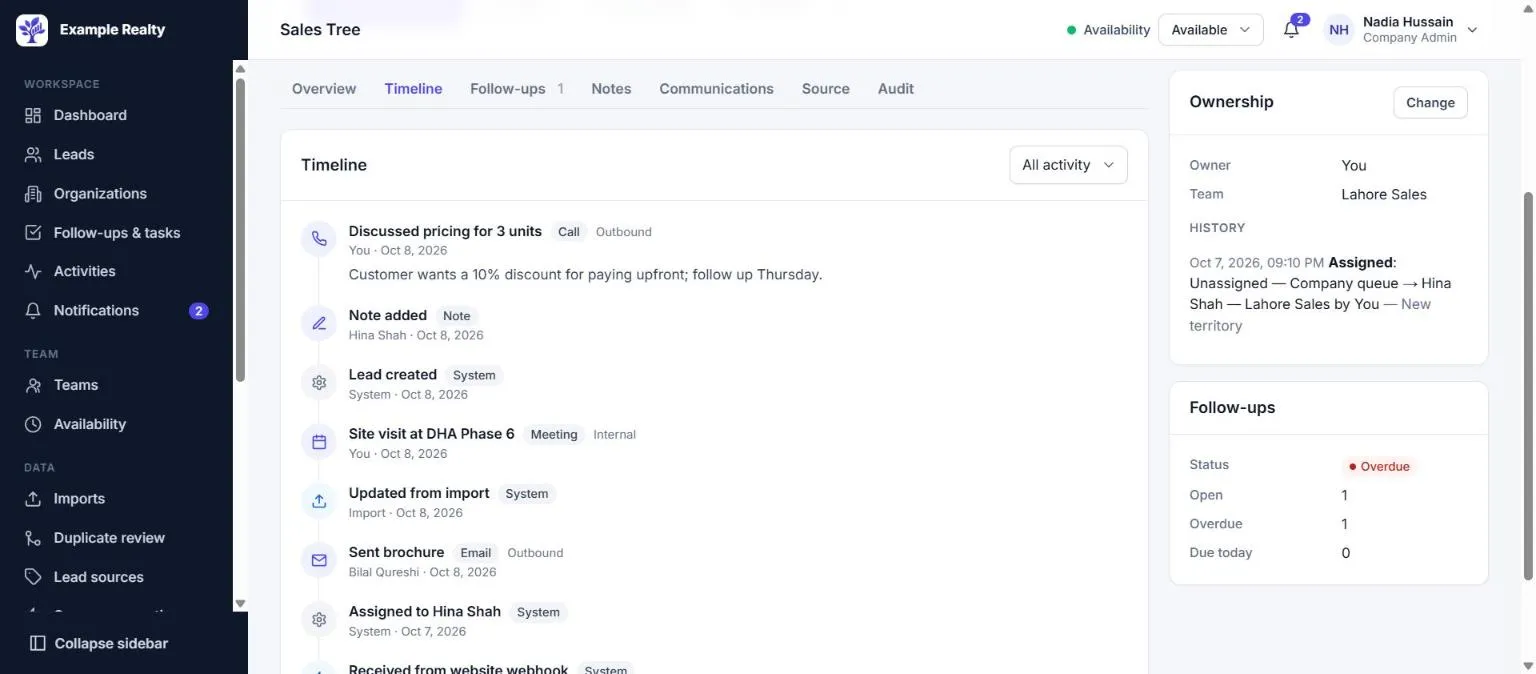
A Lead's timeline listing a call, a note, a meeting, an import update, an email and a webhook delivery.
One timelineCalls, notes, meetings, imports, assignments and integration deliveries in order.
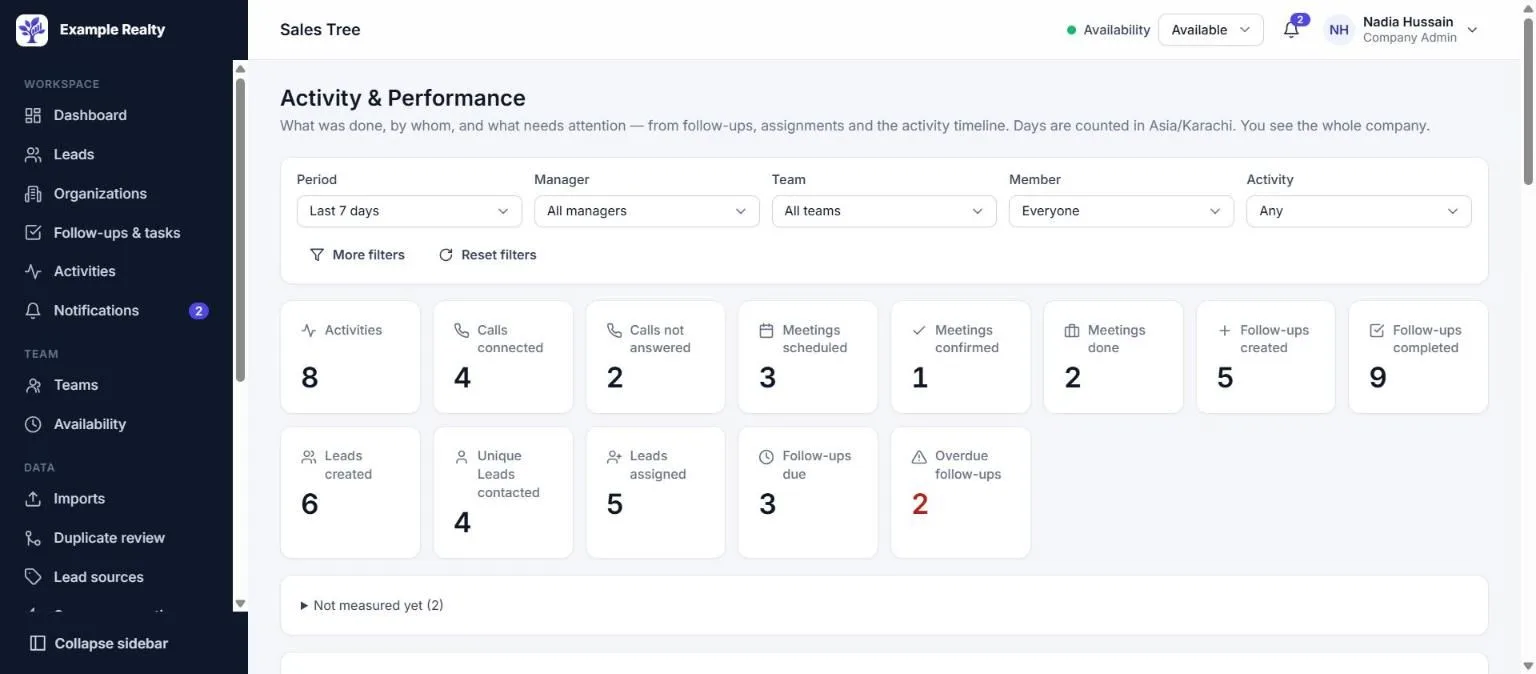
Activity and performance with filters and counts of activities, completed, due and overdue follow-ups, meetings and Leads.
Team activityWhat was done, by whom, and what is overdue, filtered by manager, team or member.

Product screens shown with sample data.

Features

Everything your sales team works with, in one place

Each feature shows its real status. Available means it's in the product today.

  • Available In the product today
  • Beta Built, not yet verified with a live provider account
  • Coming soon Built, waiting for the provider's approval
  • Planned On the roadmap

CRM and Customer Brain

Each Lead is the customer: one profile with contact details, ownership, stage, notes, activities and a single timeline that authorised users can read.

  • Lead profiles with stages, priority, tags and statusAvailable
  • Contact details and identifiersPhone numbers and emails, each unique within your company.Available
  • Lead ownership with assignment historyAvailable
  • Notes and logged activities (calls, emails, meetings)Available
  • Unified customer timelineAvailable
  • Organisations with multiple Leads eachAvailable
  • Search and filters by stage, owner, team, source and moreAvailable
  • CSV import with column mapping and previewCSV files up to 4 MB and 5,000 rows per import.Available
  • Phone and email normalisationAvailable
  • Exact-identifier duplicate preventionAvailable
  • Duplicate review queue for identity conflictsAvailable
  • Human-approved merge that keeps the history of both LeadsAvailable
  • Source attribution for every inquiryAvailable
Follow-ups and Tasks

Follow-ups give every commitment an owner, a due date and a recorded outcome, so nothing depends on memory.

  • Create and assign follow-ups on any Lead you can workAvailable
  • Due dates with in-app due and overdue notificationsNotifications appear in the app. Email and SMS reminders are not available.Available
  • Upcoming, due-today and overdue viewsAvailable
  • Priorities and task types (call, follow-up, meeting and other)Available
  • Completion outcomes, including meeting doneAvailable
  • Complete a follow-up and schedule the next one in one stepAvailable
  • Reassignment by Company Admins and ManagersAvailable
  • Audit history of every changeAvailable
  • Call, WhatsApp and email shortcuts on the Lead profileThey open your phone, WhatsApp or email app. Sending happens there and is not tracked by the app.Available

Teams, Roles and Administration

Three company roles (Company Admin, Manager, Member) and teams decide what each person can see and do.

  • Company and team managementAvailable
  • Member invitations, roles, deactivation and reactivationAvailable
  • Role-based permissions with company, team and own scopesAvailable
  • Lead assignment and transfersAvailable
  • Unassigned queues that eligible members can claim fromAvailable
  • Availability status used by routing poolsAvailable
  • Audit log of administrative and data changesAvailable
  • Dashboards and reports limited to what each role may seeAvailable

Lead Sources and Routing

Inquiries from your website, API and connected providers become Leads with their source attached, then reach the right person through your routing policy.

  • Source connection management with health and last errorsAvailable
  • API keys and signed inbound webhooksAvailable
  • WordPress and Google Ads lead form connectionsBeta
  • Meta, TikTok, LinkedIn and WhatsApp connectionsEach needs that provider's approval of the app first.Coming soon
  • Field mapping and default values per connectionAvailable
  • Duplicate-safe (idempotent) event processingAvailable
  • Intake review for inquiries that need a human decisionAvailable
  • Rules-based routing with team poolsAvailable
  • Round Robin and least-loaded distributionAvailable
  • Manual assignment at any timeAvailable
  • Routing simulator and decision historyAvailable

Communications

Today the timeline records the calls, emails and meetings your team logs. Connected messaging, email and calling are on the roadmap.

  • Customer interaction history from logged activitiesAvailable
  • New Leads from WhatsApp Business messagesWaiting for Meta's approval of the SalesTree app.Coming soon
  • WhatsApp conversations and sendingPlanned
  • Email integrationPlanned
  • Voice and call recordingPlanned
  • Conversation summaries and human handoffPlanned

AI and Automation

AI features are planned, not available yet. Rules-based routing is available today.

  • Rules-based lead routingAvailable
  • AI-assisted customer context and summariesPlanned
  • Suggested responses and follow-up assistancePlanned
  • AI lead scoring and AI-driven routingPlanned
  • AI voice agents with human handoffPlanned
  • AI usage monitoring and cost controlsPlanned

Reporting and Operations

See open work, overdue follow-ups, unassigned Leads and team activity, limited to what your role allows.

  • Lead and follow-up dashboardAvailable
  • Activity and performance with manager, team and member filtersAvailable
  • Leads by stage and by sourceAvailable
  • Follow-up completion and overdue workAvailable
  • Unassigned Lead monitoringAvailable
  • Import status and row errorsAvailable
  • Integration health and intake reviewAvailable
  • Audit log and system operationsAvailable

Your subscription gives your company access to every core feature. It never overrides role permissions or the separation between companies.

How it works

How Sales Tree works

From the first inquiry to the next action, in five steps.

  1. Capture

    Create Leads by hand, import a CSV, or receive inquiries through your website, API or a supported integration.

  2. Understand

    Each inquiry is matched to an existing customer by phone or email, keeps its source, and adds to the history.

  3. Route

    Your routing policy assigns new Leads to eligible people or leaves them in a queue someone can claim.

  4. Engage

    Work the Lead, log what happened, record the outcome and schedule the next action.

  5. Improve

    Review activity and overdue work to find bottlenecks. AI assistance will be added as it becomes available.

Lead sources and integrations

Bring inquiries in from where they start

External providers may require a developer app, account permissions, business verification or app review. Provider fees are separate from your subscription.

API and webhooks

Available

Send Leads from any system that can call an API or post a signed webhook.

Requirements
A Company Admin creates an API key or a webhook endpoint in Settings.
Setup
Settings → API keys, or Settings → Webhooks.

WordPress

Beta

Website form submissions (WPForms, Gravity Forms, Contact Form 7, Elementor and others) with page, referrer and UTM details.

Requirements
A form plugin that can post to a webhook URL.
Setup
Settings → Source connections → WordPress, then paste the URL and key into your form plugin.

Google Ads lead forms

Beta

Lead form submissions delivered by Google Ads webhooks. Each lead is counted once; clicks never create Leads.

Requirements
A Google Ads account with lead form assets and webhook delivery.
Setup
Settings → Source connections → Google Ads lead forms, then add the URL and key in Google Ads.

Meta Lead Ads (Facebook and Instagram)

Coming soon

Lead Ads forms of your Facebook Pages, including Instagram placements.

Requirements
Meta's App Review approval of the SalesTree app, then a Page admin authorises the connection.

WhatsApp Business Platform

Coming soon

New Leads from inbound messages to your WhatsApp business number.

Requirements
Meta's approval of SalesTree as a WhatsApp Tech Provider, then you connect your number through Meta's sign-up window.

TikTok Lead Generation

Coming soon

Instant Form leads from your TikTok advertiser accounts.

Requirements
TikTok's approval of the SalesTree developer app for Lead Generation access.

LinkedIn Lead Gen Forms

Coming soon

Lead Gen Form responses from your LinkedIn ad accounts.

Requirements
LinkedIn's approval of Lead Sync API access for the SalesTree app.

Provider names and trademarks belong to their owners. A connection is live only after it is set up in your company and the provider delivers to it.

AI-powered revenue engagement

Automate Repetitive Work. Keep People in Control.

These AI capabilities are on the roadmap and not available yet. Each will be off until a Company Admin turns it on.

AI automation usage is billed separately from the core Sales Tree subscription. The core product never needs AI. Model requests, voice minutes and other external services will be metered. There is no unlimited AI usage.

Customer context and summaries

A short summary of who the customer is and what happened so far, drawn from the timeline.

Planned

AI-assisted engagement

Suggested replies your team reviews before anything is sent.

Planned

Follow-up preparation

Talking points and the likely next step before a call or meeting.

Planned

Workflow automation

Automate eligible repetitive steps within the permissions you set.

Planned

Lead prioritisation and routing

Scores and routing suggestions alongside the rules you already use.

Planned

Voice automation and handoff

AI voice agents that hand the conversation to a person when needed.

Planned

Product guide

See how it works, step by step

Numbered markers on each screen match the steps.

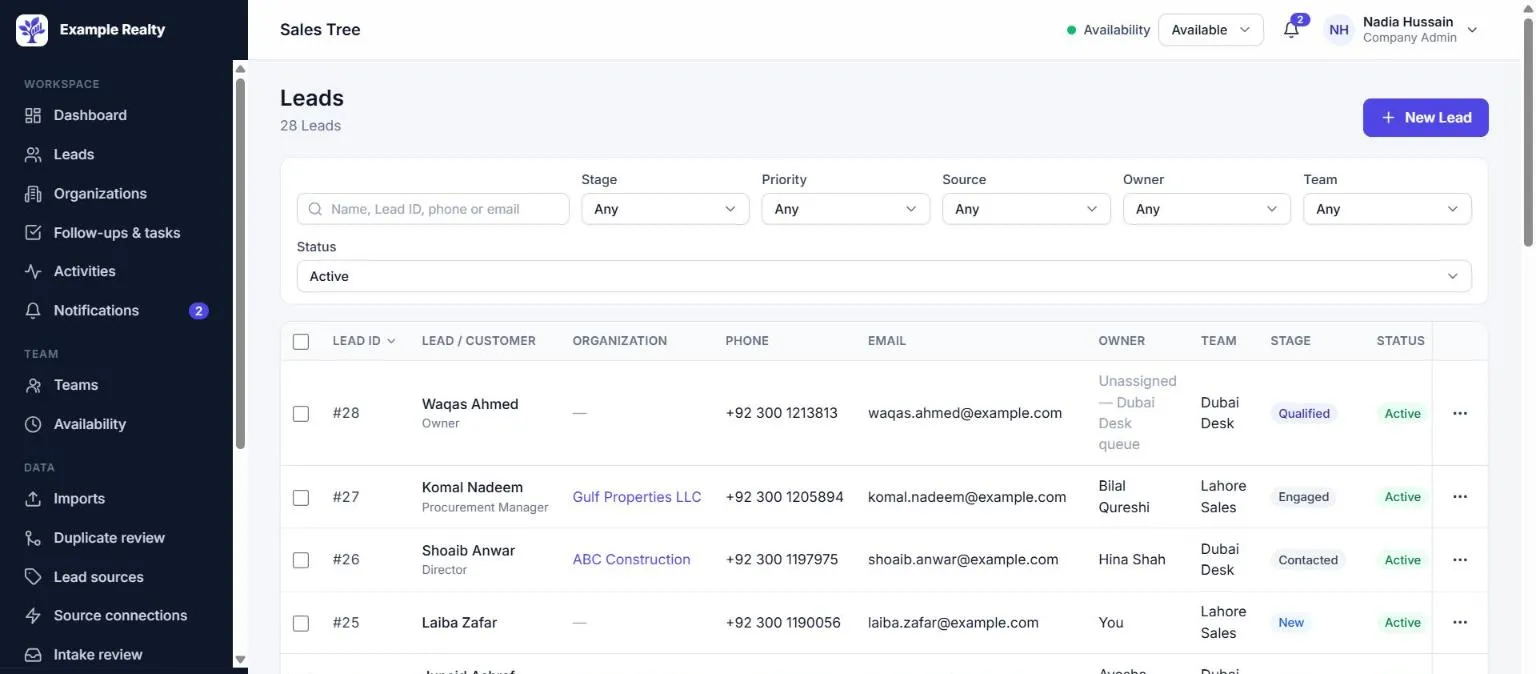
The Leads list with search, stage, priority, source, owner and team filters, and a table of Leads with their owner, team and stage.
Product screen with sample data.

Managing Leads

Available

Find, filter and work your Leads from one list.

  1. Select New Lead to add a customer. Enter a phone number or email so duplicates can be caught.
  2. Search by name, Lead ID, phone or email.
  3. Narrow the list by stage, priority, source, owner or team.
  4. Check who owns each Lead and which team it belongs to.
  5. Open the row menu to open, edit, claim or assign the Lead, or add a follow-up.

Tips and common mistakes

  • A phone number or email already used by another Lead is refused. Open that Lead instead.
  • Archived Leads are hidden by default. Change Status to see them.

Pricing and trial

One plan. Every core feature.

No artificial tiers. Add-ons and AI are billed by usage.

Sales Tree Pro

$5per user per month

30 days free for up to 3 users per company

Full access to the core Sales Tree product, with third-party add-ons and AI automation billed separately according to usage.

Start Your 30-Day Free Trial

Included

  • CRM and customer profiles
  • Organisations and customer context
  • Follow-ups, tasks and activity history
  • Teams, members and role-based permissions
  • CSV import and duplicate controls
  • Lead assignment and routing
  • Dashboards and activity reporting
  • Integration configuration and supported connections
  • Standard product updates
  • Company data isolation and role-based access

No unlimited storage, contacts, API calls, messaging or AI usage is promised. Current product limits apply, such as 5,000 rows per CSV import.

Pricing examples

Core monthly subscription by number of users
UsersCore monthly subscription
1$5
3$15
5$25
10$50
25$125
50$250

Examples exclude taxes and separately billed usage.

Separate usage charges

May apply to services you choose to use. None of them is available in the product yet, so there are no usage charges today.

  • Third-party API and provider fees
  • WhatsApp and other messaging charges
  • Telephony and call minutes
  • AI model tokens and requests
  • AI voice agent minutes
  • Other metered external services

To be confirmed: usage rates and limits.

Trial and billing

  • 30 days free for up to 3 users per company, starting when your company is created.
  • Billing is not live yet: no payment details are collected and nothing is charged today.
  • To be confirmed: whether a payment method is needed, whether paid billing starts automatically, seat counting and data access after the trial.

See the billing terms.

FAQs

Frequently asked questions

Pricing and Trial

How much does Sales Tree cost?

$5 per user per month for the core product. 30 days free for up to 3 users per company. Taxes and separately billed usage are extra.

What is included in the $5-per-user subscription?

Everything in the core product: CRM, organisations, follow-ups, teams and permissions, imports and duplicate controls, routing, dashboards, integration configuration and product updates.

Third-party provider fees, messaging, telephony and AI usage are not included.

How does the 30-day free trial work?

Sign in with your work email and create your company. The trial starts when the company is created, and your team can use the core product for free during it.

Billing is not live yet, so the trial isn't enforced in the product today.

To be confirmed: How the end of the trial is enforced once billing is live.

How many users can participate in the trial?

Up to 3 users per company.

To be confirmed: Whether the limit is enforced, and what happens when a fourth user is invited.

Is a payment method required?

No payment details are requested today, because billing is not live yet.

To be confirmed: Whether a payment method will be required to start or continue the trial.

Does the subscription start automatically after the trial?

Nothing is charged today. Billing has not been switched on.

To be confirmed: Whether paid billing starts automatically, and how much notice customers get.

What happens when the trial ends?

Billing is not live yet, so trials don't end automatically today.

To be confirmed: Access and data availability after an unpaid trial ends.

How are billable users counted?

Pricing is per user per month ($5 per user per month).

To be confirmed: Whether only active members count, and when deactivated members stop counting.

Can I add or remove users?

Yes. Company Admins invite and deactivate members at any time. A deactivated member's history is kept.

To be confirmed: How adding or removing users changes the bill (proration).

Can I cancel my subscription?

You may stop using the Service at any time. There is no paid subscription to cancel yet; cancellation rights for paid plans follow applicable law and the terms presented at purchase.

To be confirmed: The cancellation process for paid plans once billing is live.

Are taxes included?

No. Prices exclude taxes. Applicable taxes may apply where disclosed and legally payable.

How are external usage charges calculated?

Usage-based services, such as messaging, calls and AI, are billed separately according to usage. None of them is available in the product yet, so there are no usage charges today.

To be confirmed: Rates, markups and how usage is authorised and invoiced.

Are refunds available?

Nothing is charged today. Refunds and cancellation rights are subject to applicable law and any terms presented for the relevant purchase.

CRM and Customer Management

Can I import existing leads?

Yes, from CSV files of up to 4 MB and 5,000 rows each. You map the columns, preview the result and then commit. Excel files must be saved as CSV first.

How does duplicate prevention work?

Phone numbers and emails are normalised and must be unique within your company, so the same customer can't be created twice. Imports and integrations match incoming records to the existing Lead. Conflicts go to Duplicate review, and merges always need a person's approval.

Can multiple leads belong to one organisation?

Yes. An organisation can have any number of Leads.

Can I assign leads to different team members?

Yes. Company Admins and Managers assign and transfer Leads within their scope. Routing can assign new Leads automatically, and members can claim Leads from unassigned queues they can see.

Can I view a customer's history?

Yes. The Lead's timeline shows activities, notes, follow-ups, assignment changes, imports and integration deliveries, as far as your role allows.

Can I export my data?

Data cannot be exported from the app yet, including a full export of Leads.

To be confirmed: How customers can obtain a complete export of their data, for example on request.

What happens when a lead is merged or archived?

Merging keeps the history of both Leads on the surviving one. Archiving hides a Lead from everyday lists without deleting it, and it can be restored. Records are never hard-deleted in the app.

Follow-ups and Teams

Can I schedule callbacks and meetings?

Yes. Follow-ups have a task type (call, follow-up, meeting or other) and an action, a due time, a priority and an outcome when completed.

How are overdue follow-ups displayed?

Open follow-ups past their due time are marked Overdue in lists, on the Lead and on the dashboard. Owners also receive an in-app notification.

Can a follow-up have a different owner from its lead?

Yes. A follow-up stays with its owner when the Lead is transferred. Only a Company Admin or a Manager can reassign it.

Who can complete or reassign a follow-up?

Its owner can complete it. Company Admins, and Managers within their teams, can also work and reassign follow-ups. Members can't reassign.

Can managers see team activity?

Yes. Managers see activity, follow-ups and Leads for the teams they manage. Company Admins see the whole company.

Can members access records outside their permissions?

No. Permissions are enforced by the server and the database, not only hidden in the interface.

Integrations

Which lead sources are currently supported?

Manual entry, CSV import, the API and signed webhooks are available. WordPress and Google Ads lead forms are in beta. Meta, TikTok, LinkedIn and WhatsApp are coming soon, once each provider approves the app.

How do I connect Meta Lead Ads?

Not yet. The Meta connection is built but switched off until Meta approves the SalesTree app through App Review.

Can I connect TikTok and LinkedIn lead forms?

Not yet. Both need approval from TikTok and LinkedIn first.

Does SalesTree support WordPress forms?

Yes, in beta. Popular form plugins can post submissions to your connection's URL. It has not yet been verified against a live customer site.

How do Google lead sources work?

Google Ads lead form submissions are delivered by webhook, verified with your connection key and counted once per lead. This is in beta. Clicks never create Leads.

Can I connect WhatsApp Business?

Not yet. Creating Leads from WhatsApp messages is waiting for Meta to approve SalesTree as a WhatsApp Tech Provider. Conversations and sending are planned for later.

Are provider approvals required?

For Meta, WhatsApp, TikTok and LinkedIn, yes: the provider must approve the app, and you must have the right access to your own accounts.

What happens if an integration expires or fails?

The connection shows Errors with the last problem, and inquiries that need a decision wait in Intake review. Deliveries are processed once even if the provider retries.

Are third-party API fees included?

No. Fees charged by providers are separate from the subscription.

AI and Automation

Is AI included in the subscription?

AI features are not available yet. When they launch, AI usage will be billed separately from the core subscription.

How are AI costs calculated?

According to usage, such as model requests and voice minutes.

To be confirmed: AI rates and how usage is measured and invoiced.

Are AI voice calls charged separately?

Yes. AI voice minutes will be usage-based and separate from the subscription.

Can I control or disable AI automation?

That is the plan: each AI feature will be off until a Company Admin turns it on, with Off, Assist and Autonomous modes.

Can AI actions require human approval?

Yes, that is what the planned Assist mode is for.

What happens when an AI provider is unavailable?

Core CRM features don't depend on AI and keep working.

Can I set usage limits or review usage?

Usage limits and usage reports are planned alongside the AI features.

Are AI features available to every account?

Not yet; AI features are not available to any account today.

Security and Support

How does Sales Tree protect company data?

Every company's data is isolated at the database level, and roles limit what each person can see and do. Sign-in uses one-time email links instead of passwords. Integration credentials are encrypted, and connections use HTTPS. Important changes are recorded in an audit log.

Can every user access all company records?

No. Members see their own work, Managers their teams, and Company Admins the whole company.

What happens to data after cancellation?

Records are not deleted by the app today. If your access ends, the availability of workspace information may be affected, so keep copies of what you need.

To be confirmed: How long data stays available after cancellation, and how deletion requests are handled.

How long is customer history retained?

Currently for as long as the company exists; records are archived rather than deleted.

To be confirmed: A retention period, if any.

What support channels are available?

Support channels are being set up. Questions about the Terms of Service can be sent to support@salestree.app.

To be confirmed: Support email or help centre, and response times.

How do I report an integration or billing issue?

Integration errors are shown on each connection in Settings.

To be confirmed: Where customers report issues.

Give every Lead an owner and a next step.

Start with your team today. Bring in your existing Leads, set up routing, and see what needs attention.

Start Your 30-Day Free Trial

30 days free for up to 3 users per company. Then $5 per user per month for full core-feature access. Third-party services and AI automation are billed separately according to usage.